The real challenge with Code Conflicts is not simply fixing broken merges. It is resolving them quickly, accurately, and with minimal disruption to the development workflow. Teams that handle merge conflicts well tend to maintain cleaner branches, communicate changes earlier, and adopt habits that reduce repeated collisions. In practical terms, Git is not being dramatic when it stops a merge. It is just politely refusing to guess which version of the code should survive.
What Code Conflicts Are
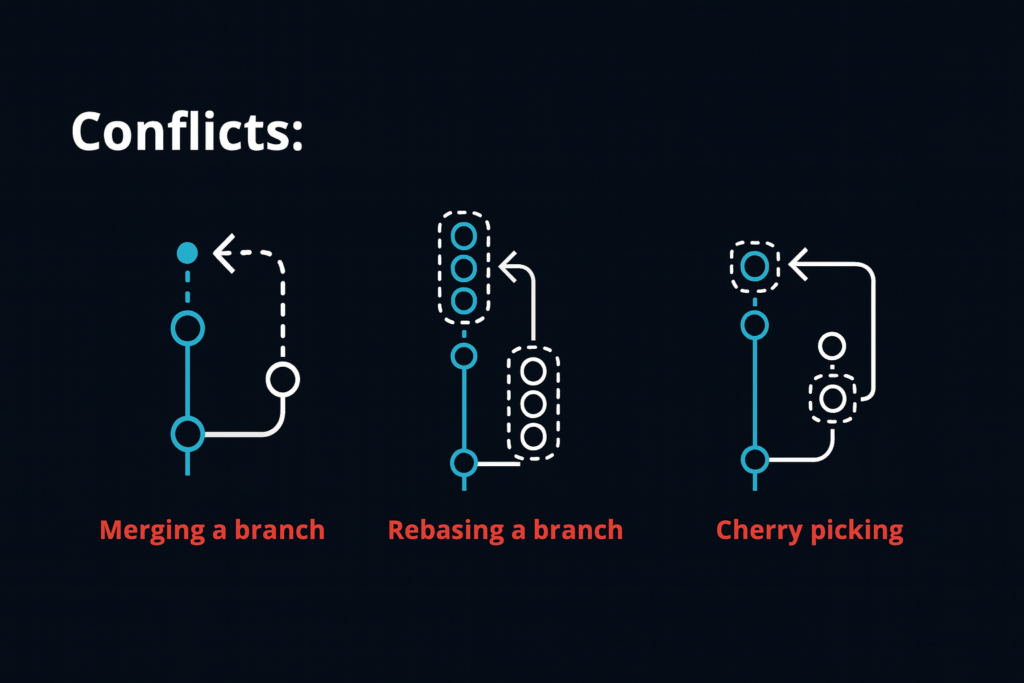
At their core, Code Conflicts are situations where Git cannot determine how to merge competing changes automatically.
Main characteristics
Code Conflicts usually involve:
- Edits to the same lines of code
- Simultaneous changes in related sections
- File deletions versus modifications
- Conflicts during merge, rebase, or cherry pick operations
- Manual intervention to complete integration
These characteristics make conflicts an expected technical checkpoint in version controlled collaboration.
Why Code Conflicts Happen
Code Conflicts happen because development often involves parallel work on shared files and logic.
Common causes
Typical reasons include:
- Two developers editing the same lines
- Large branches kept open too long
- Refactoring overlapping with feature development
- Formatting changes mixed with logic changes
- Renames, deletions, or file movement across branches
- Infrequent pulls from the main branch
Why timing matters
The longer branches diverge, the more likely it becomes that changes will overlap in confusing ways. A small conflict today can become a legendary archaeological dig next week.
Rapid Strategies for Resolving Merge Conflicts in Git
The fastest conflict resolution is not just about speed at the keyboard. It depends on a structured approach.
Update and inspect first
Before making decisions:
- Pull the latest changes
- Review the files marked as conflicted
- Understand what each branch changed
- Identify whether the conflict is cosmetic, structural, or logical
Resolve with context
When editing conflicted files:
- Read both versions fully
- Avoid blindly choosing current or incoming changes
- Preserve intended functionality
- Re test assumptions after combining code
Use Git conflict markers carefully
Git typically inserts conflict markers such as:
- Current branch section
- Separator section
- Incoming branch section
These markers show where decisions must be made. Remove them only after the final merged code is correct.
Use mergetools when useful
Visual merge tools can speed up conflict handling by making differences easier to compare, especially in larger files or complex branches.
Test immediately after resolution
Rapid resolution should still include validation:
- Run unit tests
- Build the project
- Check affected features
- Confirm that the final code compiles and behaves correctly
These steps reduce the risk of solving the merge while quietly creating a new bug.
Preventing Repeated Code Conflicts
The best strategy for rapid conflict resolution is reducing how often serious conflicts happen.
Preventive practices
Teams can lower conflict frequency by:
- Merging or rebasing branches regularly
- Keeping branches small and short lived
- Separating refactors from feature changes
- Communicating ownership of shared files
- Using consistent formatting tools
- Breaking large tasks into smaller pull requests
Why prevention works
Smaller, fresher branches are easier to integrate because fewer overlapping changes accumulate. This turns conflict resolution from a rescue mission into a routine maintenance task.
Below is a concise summary of practical strategies for handling Code Conflicts.
| Strategy |
Main Role |
Why It Matters |
| Frequent sync with main branch |
Reduces branch drift |
Prevents large and confusing conflicts |
| Careful file review |
Clarifies competing changes |
Improves resolution accuracy |
| Visual merge tools |
Simplifies comparison |
Speeds up manual conflict handling |
| Immediate testing |
Validates merged code |
Prevents hidden post merge issues |
Together, these practices help teams resolve conflicts faster and with greater confidence.
Common Mistakes During Conflict Resolution
Even experienced developers can make merge conflict handling harder than it needs to be.
Frequent mistakes
These often include:
- Choosing one side without understanding the other
- Forgetting to remove conflict markers
- Skipping testing after resolution
- Resolving formatting noise as if it were logic
- Working with stale branches for too long
- Ignoring communication with teammates about overlapping changes
Why disciplined resolution matters
A merge conflict is not just a text editing problem. It is a code integration decision. Solving it carelessly can introduce regressions, break functionality, or erase valid work from another contributor.
Conclusion
Code Conflicts are a normal part of collaborative development in Git, but they do not need to become major disruptions. By understanding why conflicts happen, reviewing changes with context, using tools effectively, and testing immediately after resolution, developers can handle merge conflicts much more quickly and accurately. Just as importantly, teams can reduce future conflicts by keeping branches short lived, syncing regularly, and communicating early about shared code.
The key takeaway is clear. Code Conflicts matter because the ability to resolve them rapidly and correctly is essential for maintaining development speed, code quality, and team collaboration.
Meta Description: Code Conflicts in Git can be resolved quickly with structured review, merge tools, regular syncing, and immediate testing after conflict resolution.
Tags: Code Conflicts, Git merge conflicts, version control, conflict resolution, Git workflow, software collaboration, branch management, developer productivity, code integration, merge strategy
Explore our “”Technology“” category for more insightful content!
Don't forget to check out our previous article: Data Mining: Techniques for Extracting Valuable Patterns and Insights from Large Datasets